
Using your artist dashboard, you can easily monitor in real-time sales data from your event.
Navigate to My Created Events in Your Dashboard

First, navigate to your dashboard and “My Created Events”
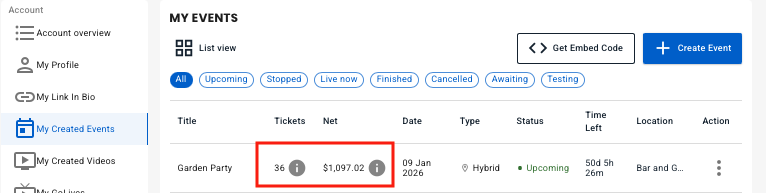
We show the total tickets sold and the total net revenue to you here.

Hovering over the tickets gives you a quick ticket count breakdown

Hovering over the sales data gives you a total sales breakdown
View Detailed Sales Data

To access your detailed sales data, click the action menu for the event and click “View Sales Data”

The detailed event sales data breaks down all gross sales, Stripe and System fees, and how things are broken down by artist.
In the example to the left, Garage Band Demos takes 80% of the cut, the opening band, Rickstar Band, gets 20%
A few explanations: For all in-person tickets, the ticket service is free for the artist. The fan pays only a $0.99 fee.
For the Virtual Livestream, vyb’s fee is 20%.
For more information on pricing and fees, please visit our pricing page here.