

Hangouts are the ultimate fan home. A home you own. No algorithm will get in the way. Your fans know they can go there, chat about your music, your concerts, and everything happening. Fans use Hangouts to organize organic meetups, help each other with travel to your shows, and hype your music and artistry to each other.
Hangouts are also dedicated to those who sign up for your community, either as a Member or All-Access. Only they will see the full feed and be able to post/like/comment. Fans who aren’t in your community will get a preview of the last several posts and get asked to join your community to get into Hangouts. Just another way we help you build your community.
A few features:
- Easily cross-post your Drops and Announcements to Hangouts.
- Fans can engage with your posts with likes and comments
- Post images, links, and more
- Set up community moderators to help you stay on top of your community
Here are the steps to setup your hangouts
Step 1: Enable Hangouts in your Dashboard

By default, Hangouts are off for your account. We know they are a commitment to your fans – but one well worth it!!
When you are ready, simply go to My Hangouts in your dashboard and click Enable Hangouts
Step 2. Invite Community Moderators

We know you are busy! We make it easy for your fans to help you run your hangout.
Navigate to My Team->Community Moderators. Add one or more community moderators.
Step 3. Post to your Hangouts


To navigate to hangouts, go to My Hangouts in your dashboard, then click “Go to Hangouts”
Then simply post what you are thinking. Note that any posts from your come from “Artist Team”
Don’t forget that all your Drops and Announcements go automatically to your hangouts.
Step 4. Check Engagement

Under my Hangouts, you can see engagement for every post at a glance
Moderation
Fans can report SPAM or hateful posts, which then automatically go into your moderation queue. We also have an AI moderator helping, but it is very forgiving. That queue is visible to you, your Community Moderators, or vyb Admin. Any of those three can moderate any posts.

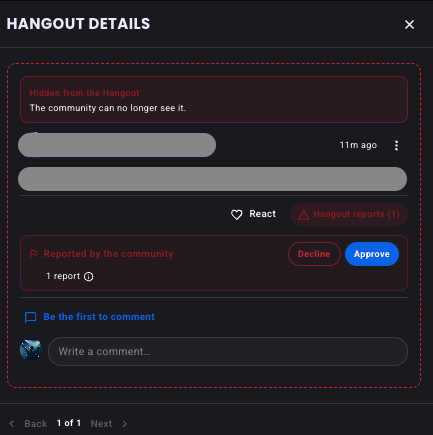
You or your Community Moderators will get an orange bar notification if something needs to be moderated. Click on that notification to bring up your moderation Queue
Next evaluate each hangout post that is in your queue. Decide if that post should be allowed or deleted
Keep your Hangout a fun and inviting place to go for your fans. A healthy community will run that Hangout, but they need to hear from you!!
Here’s some ideas for you:
- Always announce things first in your hangout, long before your socials. These are your insiders, they need to know first. If hangouts are just a repeat of your socials, after your social posts, then they lose all importance.
- Run some contests from your hangouts
- Periodically do an AMA session, fans love those! Announce it ahead of time – “This Friday I’m doing an AMA at 5pm ET, come join me in hangouts”
- Use the Hangouts to keep people in the loop on your GoLives: “I just posted soem BTS footage from backstage at last night’s show.” or “I’m going to do a GoLive on Saturday Afternoon from the Studio, come join me”
- Use Hangouts to call your fans to action: “I’ve been telling you all about the new album. I’m going to announce it on IG tomorrow. Please go check out the post!!”